
As I mentioned in my last post, I don’t know what school will look like next year yet. I do know that I need to be ready and able to flip the switch and transition to remote learning with little notice. I have been exploring strategies that offer me more flexibility to meet my students needs wherever we meet.
As part of my exploration, I attended a webinar hosted by Mandy Rice of Teach on a Mission. She asked a question that really resonated with me; if I could move all direct instruction outside of my class, what would I use my class time for? This made me think long and hard about how I currently utilize my time with my students, especially if we are on a hybrid or remote schedule. If I only “see” them once or twice a week, what do I want to use our time together for? Do I want to spend that time lecturing or do I want to have discussions, demonstrations, provide feedback and build our classroom community?
Enter the flipped classroom. A flipped classroom is one in which the students are given control of the content delivery, typically in video format. The students can choose how they want to interact with it – they can pause it, rewind or even have control over when they watch it. It sounds pretty similar to blended learning, right? In blended learning the students have some control over the time, place, path or pace of their learning. Flipping and blending naturally complement each other. Previously, I thought that flipping consisted only of videos that teachers made of themselves delivering content and the students watched them the night before the content was covered in class. This can be true – but it’s not the only way content can be flipped. Also, the videos do not have to be created by the teachers – you can use videos that have already been created like TedTalks, Khan Academy, or even be reading-based!
Why Consider Flipping Your Content?
In the past, I chose not to flip my class because I wanted to avoid assigning any additional homework to my students. They already have so much on their plate. I didn’t want to add to their workload, and I didn’t want to have to re-teach it if they didn’t do it. That is not to say that you can’t use flipped videos as homework. Some teachers have had great success with it – especially once it is part of their classroom procedures. It just isn’t right for me. However, I found multiple ways to incorporate flipped content into my blended classroom including;
-
Flex Days – Flex days can be used for the students to connect with the content before coming to class. This allows me to use our class time for activities, demonstrations, discussions, etc and provides the students with more time to connect and interact with the content.
-
Station Rotation – A flipped video can also easily become a part of station rotation! I typically try to vary the types of stations and include online, offline and teacher-led stations. Social distancing and remote learning present some obstacles to the rotation model. Catlin Tucker’s recent blog post :“Station Rotation in the Era of Social Distancing” provided some easy ways to modify these lessons. You can see an example of how I will use the station rotation model and flipped classroom in my first unit below.
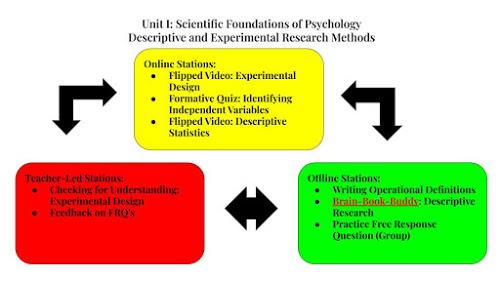
-
Online Learning- Like many of you, I am anticipating at least part of next year Being taught remotely. I do not want my kids to be unprepared. We will be using the skills necessary to be successful at online learning from day 1. This includes being familiar with our LMS platform, turning in assignments online and becoming familiar with online content delivery, including flipped learning.
Ready to Flip? Here are some general guidelines:
1. Keep your content video short and sweet. It should be no longer than 10 minutes.
2. Clearly identify what the students absolutely need to know. Use your flipped videos to address your non-negotiable content.
3. Record your videos in batches. Set up a time to record a bunch of the videos at the same time.
4. Choose your background carefully. Read Teach on a Mission’s “Tips to Creating a Teacher’s Video Background at Home” here.
4. Determine what types of things you want to include in your flipped videos. This will help you determine what platform you should use. I like to use Screencastify because the students can see me and my desktop. It is also a Chrome extension. There are a ton of options out there, click here to learn more.
5. Make sure that you have the students do something with your flipped content. You can use platforms like EdPuzzle or Google Quizzes to gather student assessment data. Or provide them with things to do while watching the video – like Retrieval Notes, Cornell Notes or discussion preparation. I will dedicate next week’s blog post to this very topic!
6. Lastly, your videos should reflect you! This is a really flexible strategy. Do what works for you and your students!
Are you interested in learning more? Check out the following blogs & resources:
2. Clearly identify what the students absolutely need to know. Use your flipped videos to address your non-negotiable content.
3. Record your videos in batches. Set up a time to record a bunch of the videos at the same time.
4. Choose your background carefully. Read Teach on a Mission’s “Tips to Creating a Teacher’s Video Background at Home” here.
4. Determine what types of things you want to include in your flipped videos. This will help you determine what platform you should use. I like to use Screencastify because the students can see me and my desktop. It is also a Chrome extension. There are a ton of options out there, click here to learn more.
5. Make sure that you have the students do something with your flipped content. You can use platforms like EdPuzzle or Google Quizzes to gather student assessment data. Or provide them with things to do while watching the video – like Retrieval Notes, Cornell Notes or discussion preparation. I will dedicate next week’s blog post to this very topic!
6. Lastly, your videos should reflect you! This is a really flexible strategy. Do what works for you and your students!
Are you interested in learning more? Check out the following blogs & resources:
-
Balance with Blended Learning by Catlin Tucker. Balance is my mantra for the upcoming school year. This book has provided a wealth of ideas. Check out her blog, too!
-
Teach On A Mission by Mandy Rice. If you are interested in learning more about the Flipped Classroom, check out her resources! She has a blog, free video tutorials and offers a paid, online course (summer cohort closes 7/5/2020)
Please let me know if you have any questions or comments! Also, subscribe to my blog and get alerted to new posts in your email box.
 Blended Learning Journey
Leave a comment